


FamilyAlbum - Photo Sharing
4.86.30K Reviews
App Specs
- Version
- Varies with Device
- Updated On
- License
- Free
- Downloads
- 10,000,000+
- Developer
- MIXI, Inc.
- Categories
- Parenting
- Platform
- Android, iOS
Screenshots



 Analysis by AppCompare
When family photos are scattered across camera rolls, group chats, and shared folders, the hard part is often not taking pictures but finding a comfortable way to share them with the people who care. FamilyAlbum is a parenting app from MIXI, Inc. built around that family-photo routine. I like the idea of giving a child’s pictures a dedicated home, but I would treat it as a focused sharing space rather than a complete answer to every question about storing and protecting family memories.
A family space, not just another camera roll
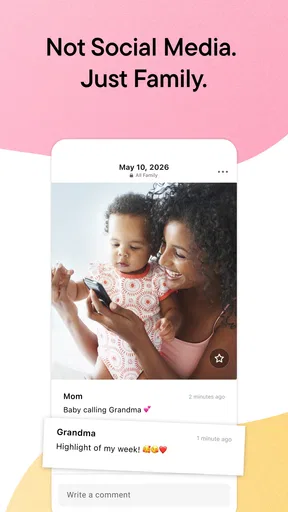
The distinction matters most when a child has relatives who want to follow along but do not need access to every part of a parent’s phone or social feed. Instead of forwarding individual pictures whenever someone asks, a family can use one shared place for those updates. That can make day-to-day sharing feel less like a chore, especially when several relatives live far away or cannot attend ordinary milestones in person.
A dedicated album also changes how I would choose what to post. I would use it for pictures and clips I am happy to share with the invited circle, while keeping more personal material elsewhere. That small separation is useful: it helps make the app’s purpose clear and reduces the temptation to treat a shared family space as a universal archive for every image on a device.
Trust starts with deliberate sharing
Photos of children deserve more thought than a casual snapshot of lunch. A family image can reveal faces, routines, relationships, or the setting of an ordinary day, even when nobody intends to disclose much. For that reason, I would decide who belongs in the sharing circle before uploading a large backlog, and I would talk with close relatives about keeping shared pictures within that circle.
The app’s family-focused approach is appealing, but I would not equate a private audience with zero risk. A trusted recipient can still save or show an image outside the app, and no sharing tool can make relatives agree about what should be posted. The practical safeguard is a thoughtful audience and a family norm: share only what the child’s parents are comfortable circulating, and check before adding someone whose relationship or role has changed.
What I would check before making it the family archive
If I were setting this up, I would first look through the app’s current permission prompts and account settings on my own device, then decide which permissions are needed for the way I plan to use it. I would also review who can access the family space and how invitations are handled before uploading sensitive pictures. Those are useful habits for any photo-sharing service; I would not assume a particular control or privacy guarantee without seeing it in the app.
I would also think about the difference between sharing and backup. A place where relatives can view family moments may be convenient, but I would not make it my only copy of pictures I could not replace. Keeping important originals in a separate location gives the family another route to them if a phone is lost, an account becomes inaccessible, or the household later changes services. That bit of redundancy is less exciting than a slideshow, but it is a sensible trade-off for irreplaceable memories.
Worth Reading Before You Choose

Baby Panda World Brings Quick Play to Modern Phones, but Its Game Library Feels Busy

ESPN’s Live Game View Makes Following Close Games Easier

QuizzLand Review: A Good Fit for Short Trivia Breaks, Not Every Player

Basketball Stars: Multiplayer Is Fast, but Can It Recover When Matches Go Wrong?

WEBTOON Turns Phone Updates Into a Better Reading Routine

Link to Windows Runs on Shared Habits, Not Social Feeds
Who is likely to appreciate it
I can see this being a good fit for parents who regularly send child updates to a close group of relatives and want those moments to stay organized by family rather than disappear inside message threads. Grandparents and other invited relatives may also appreciate having a place to catch up without needing every picture sent individually. It is especially useful when the family’s main goal is sharing familiar milestones, not editing images or managing a professional photo collection.
I would be more cautious if you prefer not to upload children’s images to a dedicated service, or if your relatives already use a shared folder that everyone understands and checks. A messaging group can be more immediate for a quick update, while a general cloud-photo service may suit people who want one archive for all their pictures. FamilyAlbum’s appeal is its narrower family purpose; that focus is a benefit only when it matches the way your household wants to share.
Effortless Photo Sharing
Okay, so let’s talk about how FamilyAlbum makes sharing those precious moments a breeze. You can upload photos and videos super easily, and the best part? There’s no limit! That means you can go wild capturing every giggle, first step, and family gathering without worrying about running out of space. Plus, it’s all stored securely, so no more sleepless nights worrying about losing those memories.
For a realistic routine, imagine taking a few pictures during a busy weekday and uploading the ones you want relatives to see once the child is asleep. That avoids interrupting the moment to send each image to several people. I would still pause before uploading automatically or in bulk: a quick selection step lets me leave out blurry shots, private situations, and images that are better kept between parents. The convenience is strongest when sharing stays intentional rather than becoming another stream of everything the camera captured.
A Timeline to Relive Memories
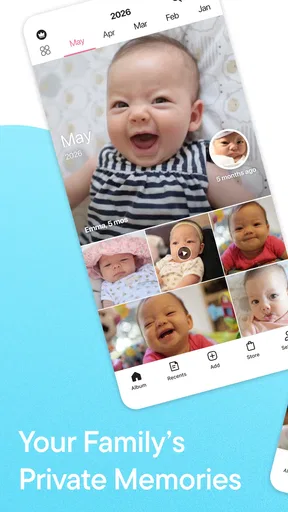
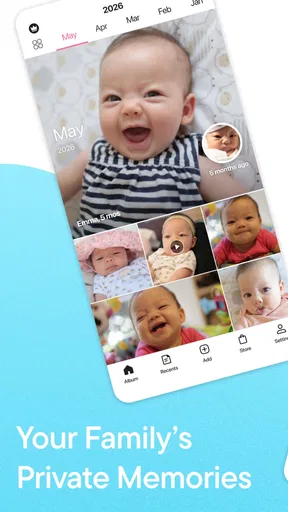
One of the standout features of FamilyAlbum is its chronological timeline. It automatically organizes your uploads by date, so you can effortlessly flip back through the months and years. It’s like having a personal time machine for your photos. You can even add comments and notes to each picture, making it easy to remember the story behind every smile.
That date-based arrangement can be more useful than it first sounds. If a relative asks when a particular visit happened, or you want to compare how a child has changed over time, browsing in sequence is easier than searching through a camera roll mixed with screenshots and unrelated pictures. My tip would be to add a short note when the context might otherwise fade: a child’s funny phrase or the reason everyone was together can matter more later than a perfect caption.
There is a trade-off, though. A timeline is excellent for revisiting memories in order, but it is not necessarily the best way to find a particular subject quickly if you do not remember roughly when it happened. I would keep especially meaningful milestones easy to recognize through the app’s available organization tools, rather than assuming chronological browsing will answer every search. A timeline works best as a living family story, not as a substitute for a carefully indexed photo library.
Perfect for Privacy
Now, let’s chat about privacy, because I know it’s a biggie. With FamilyAlbum, you have total control over who gets to see your photos. You invite family members and close friends, ensuring that only the people who matter most are in on the fun. No unwanted eyes on your family’s special moments, just the way it should be.
I would phrase the real-world benefit more cautiously: limiting the audience to invited people is a meaningful choice, but it is not a promise that a picture can never travel further. Before inviting relatives, I would explain what the album is for and ask them not to repost or forward a child’s images without checking. That simple conversation can prevent awkwardness later, particularly when different family members have different ideas about sharing children’s pictures online.
Another useful habit is to revisit the audience when circumstances change. A family circle that made sense when an album was created may not be right forever. I would periodically check the people who can see the shared material and remove access where it is no longer appropriate, using the controls available in the app. This is a practical way to keep the audience aligned with the family’s current wishes rather than treating an old invitation as permanent by default.
Creating Beautiful Memories
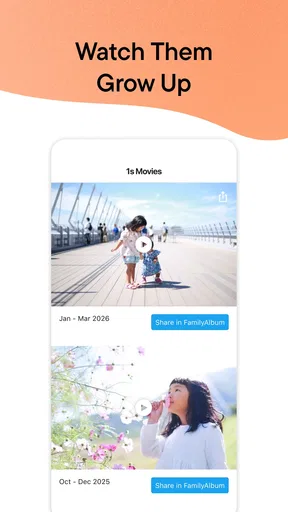
If you’re someone who loves a bit of creativity, you’ll appreciate the album and slideshow features. You can create themed albums for birthdays, holidays, or any special occasion. The app even generates personalized slideshows, complete with music, turning your photos into beautiful keepsakes. It’s like having your own little movie studio in your pocket!
The creative options work best when they serve a clear purpose. A birthday collection can make it easier to revisit one occasion without scrolling through months of everyday pictures, while a slideshow gives relatives a simple way to enjoy a selection together. I would choose a smaller set of images for a themed collection rather than trying to include everything. A few photos that tell the story of the day usually make a more satisfying keepsake than a long sequence of near-identical shots.
These features also make the app different from a plain messaging thread. Messages are good for immediate reactions, but pictures can get buried as the conversation moves on. A shared family album keeps the emphasis on revisiting the moments themselves. On the other hand, someone who wants detailed photo editing, extensive file management, or a single library for every image may prefer a general-purpose photo service alongside—or instead of—a family-focused app.
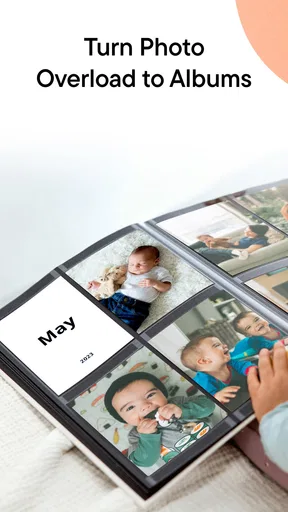
And let’s not forget about the photo books. FamilyAlbum lets you order high-quality photo books straight from the app. It’s a fantastic way to transform digital memories into something tangible that you can flip through on a cozy Sunday afternoon.
A printed book is a different kind of keepsake from a screen-based album, and I like that it gives families a way to revisit selected pictures together without opening an app. I would treat it as an optional project rather than the main reason to join: first see whether the sharing and browsing habits suit your family, then decide if a physical copy of a particular stretch of memories is worth making. Before placing an order, I would review the choices and total shown in the app so the purchase fits the family’s budget.
Keeping Everyone Updated
With its smart notifications, FamilyAlbum ensures that no one misses out on new uploads. Whether it’s grandma or your cousin across the country, everyone stays in the loop. It’s like sending out a digital hug every time you upload a new memory.
Notifications can make the shared space feel lively, but not every relative wants an alert for every upload. I would encourage family members to adjust notification preferences in whatever way the app allows, or to agree on a comfortable posting rhythm. For parents, the same point works in reverse: turning every small moment into an update can create pressure to document family life instead of simply enjoying it. The best routine is one that stays easy for the people posting as well as the people watching.
Cost, fit, and everyday trade-offs
The app is free to download, and its average rating is 4.8 from around 330,000 ratings, with more than 10 million installs. It is rated Teen, and in-app purchases are available, ranging from $0.99 to $109.00 per item. I would check the price shown for any optional purchase before confirming it, especially if a printed keepsake is part of the plan. The rating and broad adoption suggest that many people find the idea useful, but they cannot tell me whether its sharing approach fits my own family’s privacy preferences.
FamilyAlbum was released on April 14, 2015, and is developed by MIXI, Inc. For me, the important decision is not simply whether an app is popular or free to start using; it is whether my relatives will actually use a dedicated family space and whether I am comfortable putting selected child photos there. If everyone prefers a different service, a new album can become one more place to check. I would invite a small, trusted group first and see whether the routine feels natural before building a large archive around it.
A cautious recommendation
So, if you’re on the hunt for a user-friendly and secure way to share your family’s moments, FamilyAlbum is definitely worth checking out. It’s like having a little piece of home with you wherever you go, keeping your loved ones close even when they’re miles away. Happy sharing!
My recommendation is for parents who want a dedicated place to share selected child photos with relatives and who are willing to make audience and posting choices thoughtfully. I would skip it if you are uncomfortable putting family pictures into a sharing app, need a highly searchable archive for a large collection, or already have a shared system your family reliably uses. For everyone else, start with a few ordinary, low-sensitivity pictures, check the available account and audience controls, and see how the experience feels before adding more personal memories. That is the balance I would want: useful connection for the family, without letting convenience make the privacy decisions on my behalf.
Pros
- User-friendly interface for all ages.
- Unlimited storage for photos and videos.
- High-quality photo backup options.
- Private and secure family sharing.
- Monthly photo books available.
Cons
- Limited editing tools available.
- No desktop version for easy access.
- Requires internet for full functionality.
- Ads in the free version can be intrusive.
- Limited to family sharing
- not public.
FAQs for FamilyAlbum - Photo Sharing
What is FamilyAlbum and how does it work?
FamilyAlbum is a photo-sharing app designed for families to safely and privately share photos and videos. Users can create albums, upload media, and share them with family members. The app offers features like automatic organization, photo books, and milestone tracking, making it easy for families to connect and cherish memories together.
Is FamilyAlbum secure for sharing personal photos?
Yes, FamilyAlbum prioritizes user privacy and security. All photos and videos are stored securely, and only invited family members can access shared content. The app employs encryption and does not sell user data, ensuring that your family’s memories are protected from unauthorized access.
Does FamilyAlbum offer any storage limits?
FamilyAlbum provides unlimited storage for photos and videos at no cost. Families can upload as many memories as they wish without worrying about storage constraints. Additionally, the app offers a premium subscription for users who want access to more features, such as longer videos and additional customization options.
Can I create physical photo albums with FamilyAlbum?
Yes, FamilyAlbum allows users to create physical photo books directly from the app. You can select your favorite photos, customize the layout, and order printed albums. This feature makes it convenient to turn digital memories into tangible keepsakes, perfect for gifts or personal collections.
Is FamilyAlbum available on both Android and iOS devices?
FamilyAlbum is available for download on both Android and iOS platforms. Users can find the app in the Google Play Store and Apple App Store, ensuring compatibility with a wide range of devices. This cross-platform availability makes it easy for all family members to stay connected, regardless of their preferred device.


